
Microsoft has started rolling out new firmware updates for Surface Go 4. The latest update is available for Surface Go 4 devices running Windows 10, Version 22H2 or later.
The new firmware update addresses device security vulnerability related to Intel advisory CVE 2025-20006 that may allow unauthenticated user to enable denial of service via adjacent access. The update is listed as a “June 19 release” on the Surface Go 4 Update History page.
Changelog for June 19, 2025 Updates
Microsoft has released a complete changelog for the latest updates, which includes the name and version listed in Windows Updates and Device Manager.
| Windows Update Name | Device Manager |
|---|---|
| Intel – net – 23.110.0.5 | Intel(R) Wi-Fi 6 AX201 160MHz – Network adapters |
| Intel Corporation – Bluetooth – 23.110.0.5 | Intel(R) Wireless Bluetooth(R) – Bluetooth |
Getting the Updates via Windows Update
You can get this new Firmware Update via Windows Updates, as we detailed here:
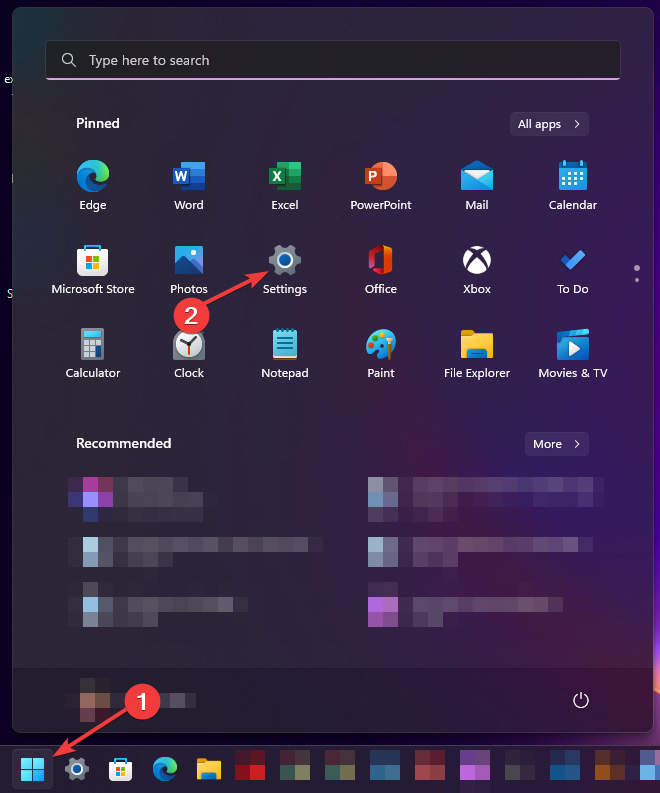
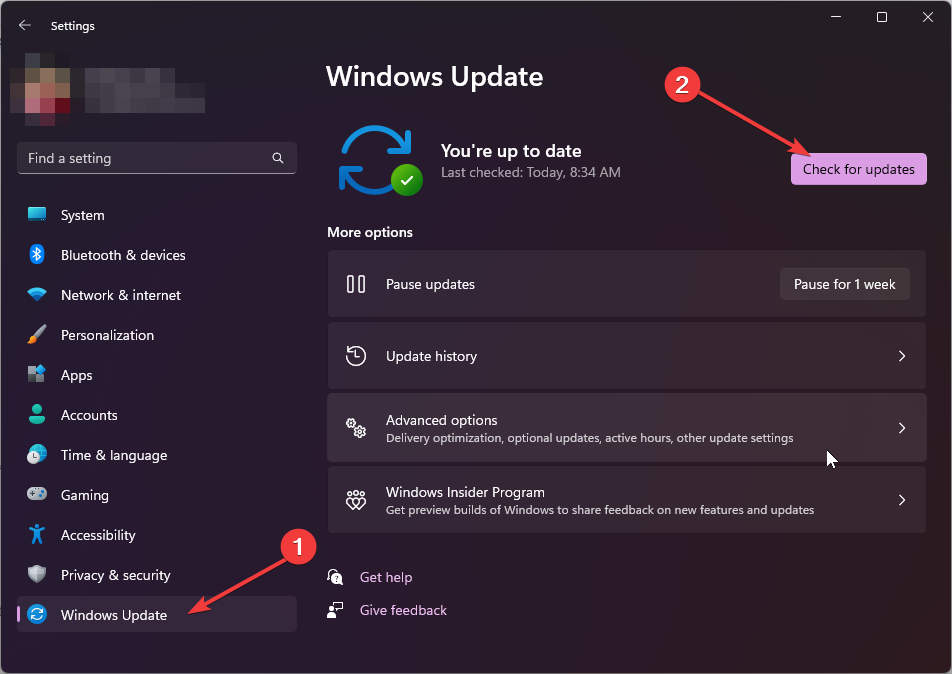
On Windows 11:
- Go to Start > Settings (Win + I)

- Go to Windows Update and click on the Check for Updates button.

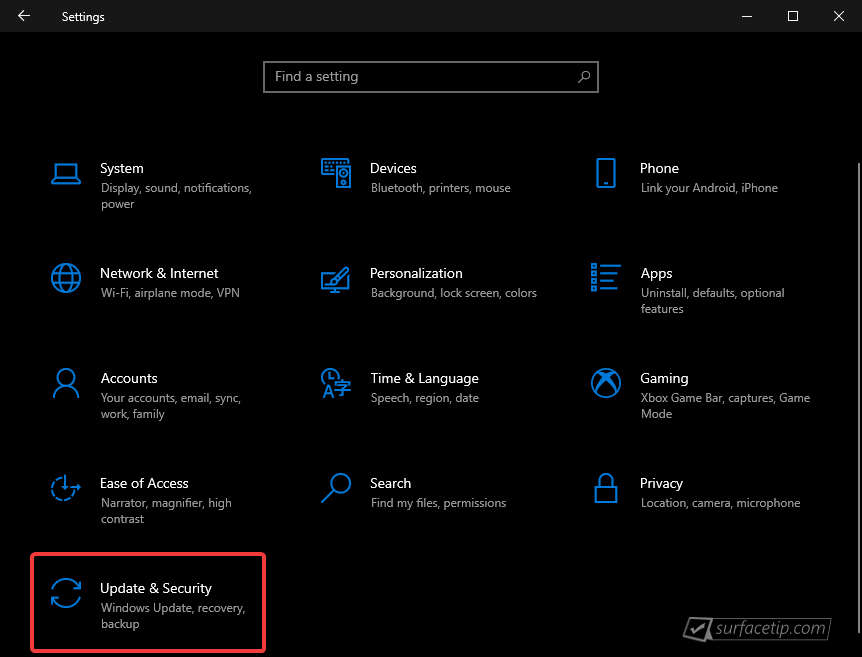
On Windows 10:
- Go to Start > Settings > Update & security.

- From the Windows Update tab, click the Check for updates button.


If your Surface Go 4 didn’t receive the update, it should appear on the Windows Update list by now.
Downloading the Updates from Microsoft
Alternatively, you can download the latest cumulative driver and firmware updates for Surface Go 4 from the Microsoft Download Center by using the following links.
- Surface Go 4 Drivers and Firmware
https://www.microsoft.com/en-us/download/details.aspx?id=105609
Surface Go 4 Update History
 How to get updates, improvements and fixes in the updates, and additional steps for Surface Go 4.View
- How to get updates, improvements and fixes in the updates, and additional steps for Surface Go 4.View
- How to get updates, improvements and fixes in the updates, and additional steps for Surface Go 4.View
- Addresses potential security vulnerabilities that may allow denial of service, escalation of privilege, code execution, or information disclosure, fixes an issue with incorrect serial numbers and model names for the device, and resolves an issue where the device incorrectly shows an “Unauthenticated battery detected” notification.View
- Addresses potential security vulnerabilities related to Intel® PROSet/Wireless WiFi Software Advisory INTEL-SA-01398 that may allow denial of service.View
- Addresses potential security vulnerabilities related to Intel® Chipset Firmware Advisory INTEL-SA-01280 that may allow escalation of privilege or information disclosure. and enhances the stability of the device, reducing the occurrence of blue screen during instances including reboot and shutdown requests.View
- Addresses potential security issues that may allow escalation of privilege, denial of service, or information disclosure, improves stability by fixing blue screen issues related to using extended monitors, and fixes interface issues between the graphics and camera to ensure stable performance.View
- Addresses device security vulnerability related to Intel advisory CVE 2025-20006 that may allow unauthenticated user to enable denial of service via adjacent access.
- Ensures that devices can boot successfully using the Preboot Execution Environment (PXE). and enhances device connectivity and functionality when docked, ensuring seamless compatibility and improved performance with connected peripherals.View
- Addresses a potential security vulnerability related to Intel® Graphics Software Advisory INTEL-SA-1253 that may allow escalation of privilege or denial of service, addresses a security vulnerability related to Intel® Arc™ & Iris® Xe Graphics Software Advisory CVE-2024-21864 that may allow unauthenticated user to potentially enable escalation of privilege via adjacent network access. , improves system stability and display experience by reducing Timeout Detection and Recovery (TDR) events, which led to the system becoming unresponsive or crashing. , and resolves the issue with Citrix Workspace* application exhibiting sluggish behavior when interacting with a virtual desktop. .View
- Enables improved performance when connected to the newly launched Surface USB4 Dock for Business. .View
- Addresses device security vulnerabilities against potential threats and addresses security vulnerability related to Dolby advisory CVE-2024-44074 that compromised local privilege.View
- Ensures seamless audio playback and recording and improves stability by preventing audio failures and drop out, fixes a flickering or screen flashing issue when the device is connected to Surface Dock 2, addresses security vulnerabilities, securing devices from potential threats, and more.View
- Addresses a potential security vulnerability related to Intel® Security Advisories INTEL-SA-00999, INTEL-SA- 01083 & INTEL-SA- 01071, addresses data collection regulatory requirements and updates the consent experience for data transmission, and resolves the issue that was preventing the Battery Limit setting to function as expected.View
- Resolves potential issue where some customers reported having inconsistent inking and missing strokes while using the Slim pen and enhances the longevity and safety of the device's battery life.View
- This update addresses a potential security vulnerability related to Intel® Security Advisories INTEL-SA-00923, INTEL-SA-00929, and INTEL-SA-00950.View
- Improve audio stability and performance and enable better interoperability with the Surface Thunderbolt 4 Dock.View


COMMENTS
Let us know what you think!
We appreciate hearing your thoughts, questions, and ideas about “Surface Go 4 recieves new (June 19, 2025) firmware updates”.