
Microsoft has started rolling out new firmware updates for Surface Laptop 5. The latest update is available for Surface Laptop 5 devices running Windows 11, Version 23H2 or later.
The new firmware update how to get updates, improvements and fixes in the updates, and additional steps for Surface Laptop 5. The update is listed as a “May 20 release” on the Surface Laptop 5 Update History page.
Changelog for May 20, 2026 Updates
Below is the complete changelog provided by Microsoft for the new updates. It includes the name and version listed in the Windows Updates and the name listed in Device Manager.
| Windows Update Name | Device Manager |
|---|---|
| Intel net Driver Update (24.20.2.1) | Intel(R) Wi-Fi 6 AX201 160MHz – Network adapters |
| Intel Corporation Driver Update (24.20.0.3) | Intel(R) Wireless Bluetooth(R) – Bluetooth |
Getting the Updates via Windows Update
You can get this new Firmware Update via Windows Updates, as we detailed here:
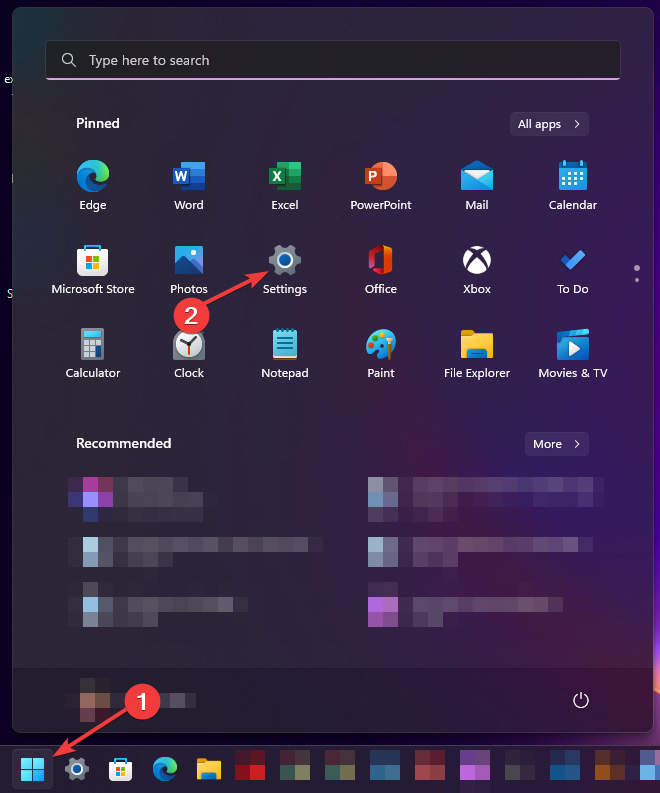
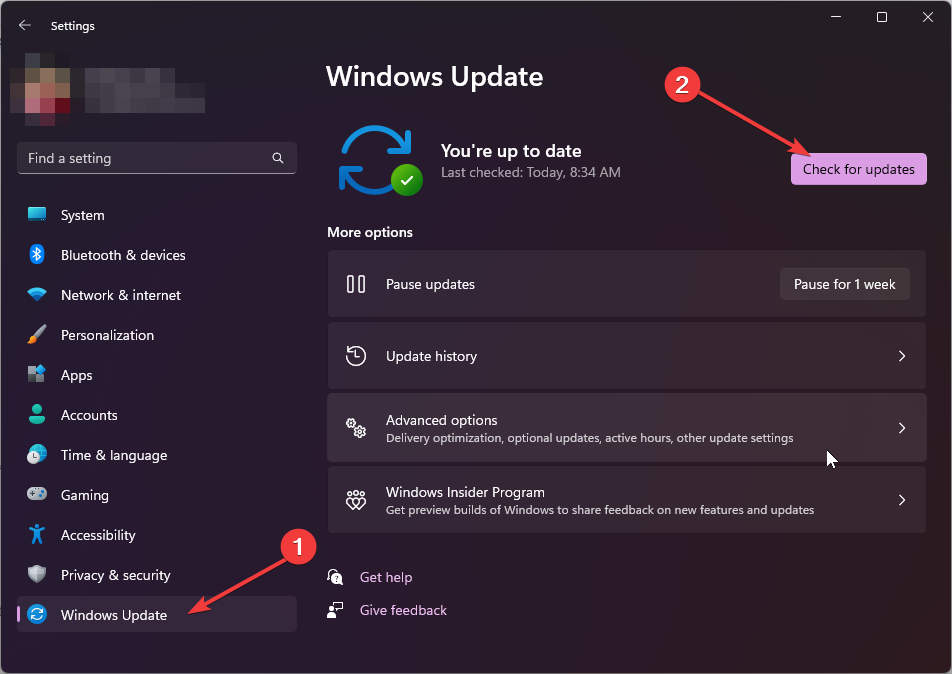
On Windows 11:
- Go to Start > Settings (Win + I)

- Go to Windows Update and click on the Check for updates button

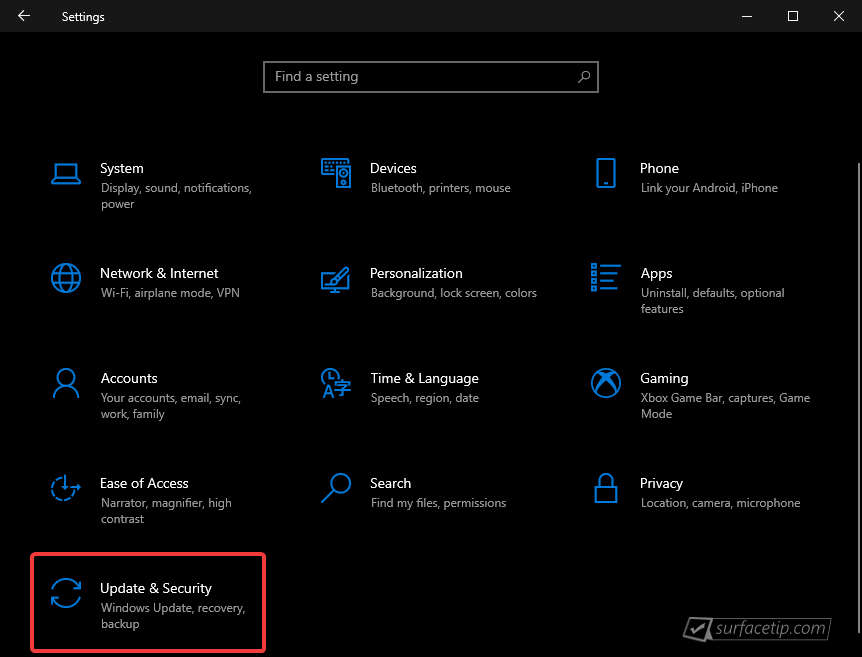
On Windows 10:
- Go to Start > Settings > Update & security.

- From the Windows Update tab, click Check for updates


If your Surface Laptop 5 didn’t receive the update, it should appear on the Windows Update list by now.
Downloading the Updates from Microsoft
Alternatively, you can download the latest cumulative driver and firmware update for Surface Surface Laptop 5 from Microsoft Download Center via the following links.
- Surface Laptop 5 Drivers and Firmware
https://www.microsoft.com/download/details.aspx?id=104679
Surface Laptop 5 Update History
 How to get updates, improvements and fixes in the updates, and additional steps for Surface Laptop 5.View
- How to get updates, improvements and fixes in the updates, and additional steps for Surface Laptop 5.View
- How to get updates, improvements and fixes in the updates, and additional steps for Surface Laptop 5.View
- How to get updates, improvements and fixes in the updates, and additional steps for Surface Laptop 5.View
- How to get updates, improvements and fixes in the updates, and additional steps for Surface Laptop 5.
- Firmware updates can’t be uninstalled or reverted to an earlier version, when you install the latest update, you'll also get all the previous updates if your Surface doesn't have them already. Only updates that apply to Surface will be downloaded and installed, and after the updates are installed, restart your device to complete the installation process. To restart your device, select Start , and then select Power > Restart.View
- Addresses potential security vulnerabilities that may allow denial of service, escalation of privilege, code execution, or information disclosure and fixes an issue with incorrect serial numbers and model names for the device.View
- Resolves an issue where the device incorrectly shows an “Unauthenticated battery detected” notification.View
- Addresses a potential security vulnerability that may allow unauthorized access, resolves potential security vulnerabilities to enhance the overall security of the system. , fixes an issue where the keyboard does not work after the device restarts, and more.View
- Addresses potential security vulnerabilities related to Intel® Chipset Firmware Advisory INTEL-SA-01280 that may allow escalation of privilege or information disclosure.View
- Addresses potential security issues that may allow escalation of privilege, denial of service, or information disclosure, improves stability by fixing blue screen issues related to using extended monitors, and fixes interface issues between the graphics and camera to ensure stable performance.View
- Enhances the stability of the device, reducing the occurrence of blue screen during instances including reboot and shutdown requests.View
- Addresses device security vulnerability related to Intel advisory CVE 2025-20006 that may allow unauthenticated user to enable denial of service via adjacent access.View
- Ensures that devices can boot successfully using the Preboot Execution Environment (PXE) and enhances device connectivity and functionality when docked, ensuring seamless compatibility and improved performance with connected peripherals.View
- Addresses security vulnerability related to Dolby advisory CVE-2024-44074 that compromised local privilege. , addresses a potential security vulnerability related to Intel® Graphics Software Advisory INTEL-SA-1253 that may allow escalation of privilege or denial of service. , addresses a security vulnerability related to Intel® Arc™ & Iris® Xe Graphics Software Advisory CVE-2024-21864 that may allow unauthenticated user to potentially enable escalation of privilege via adjacent network access. , and more.View
- Enhances the overall security posture of the devices, protecting customers from potential threat, prevents unexpected failures or disruptions of audio streams by improving the stability and reliability of the audio system to enable uninterrupted audio playback and recording, and ensures seamless audio playback and recording, improves stability preventing audio failure and drop out.View
- Improves the device experience by providing faster response times for Wi-Fi connectivity and addresses security vulnerabilities, securing devices from potential threats.View
- Improves the Battery Smart Charging feature by activating protection only when necessary, which helps extend the battery's lifespan and maintain its health, fixes an issue with the Battery Smart Charging mode which doesn't update when disabled via Surface App, reinforces an authentication feature to address a significant security vulnerability within Surface System Aggregator Module, and fixes a problem with sudden shutdown while connected to power supply.View
- Provides a seamless experience when connecting two devices via USB-C for direct peer-to-peer communication and resolves the issue that was preventing the Battery Limit setting to function as expected.View
- Addresses a potential security vulnerability related to Intel® Security Advisories INTEL-SA-00999, INTEL-SA-01083 & INTEL-SA-01071.View
- Address data collection regulatory requirements and updates the consent experience for data transmission.View
- Mitigates a potential security vulnerability related to Intel® Security Advisory INTEL-TA-00947 that may lead to unauthorized privileged access into a system, denial of service, or information disclosure and fixes an issue that incorrectly changed the form factor of the laptop to that of a Convertible.View
- Addresses a potential security vulnerability related to Intel® Security Advisories INTEL-SA-00923 & INTEL-SA-00929, improves audio quality by addressing application crash issue when using a file in Dolby format, and enhances the audio system's stability and reliability to ensure seamless playback and recording, preventing any potential disruptions or failures that may interrupt audio streams.View
- Resolve intermittent boot to Windows logo issues, address battery error messages in the Surface App, and improve Surface Thunderbolt 4 Dock stability.View
- Addresses a concern where users were experiencing unexpected shutdowns and prolonged system boot time, improved the interoperability with the Surface Thunderbolt 4 Dock by resolving issues that were preventing the system from detecting audio devices, and addresses a false battery related error message in the Surface App.View
- Better pen inking performance, improved graphics stability, better support for the 3rd party apps.View
- Better pen inking performance, improved graphics stability, better support for the 3rd party apps.View
- This update addresses a potential security vulnerability related to Intel® Security Advisory INTEL-SA-00783, addressing CVE-2022-36392 & CVE-2022-38102.View
- Improves device stability, resolving system crash issue and resolves external display connection issue.View
- Enables the automatic download of Intel® Connectivity Performance Suite (ICPS) application on Surface Laptop 5 consumer devices running Windows 11 and have a hard disk capacity greater than 256 GB. ICPS is a software solution that improves PC networking performance by creating a personalized network experience based on each user's unique situation.View
- Enables the automatic download of Intel® Connectivity Performance Suite (ICPS) application on Surface Laptop 5 consumer devices running Windows 11 and have a hard disk capacity greater than 256 GB. ICPS is a software solution that improves PC networking performance by creating a personalized network experience based on each user's unique situation.View


COMMENTS
Let us know what you think!
We appreciate hearing your thoughts, questions, and ideas about “Surface Laptop 5 May 2026 update is now rolling out”.