Microsoft has started rolling out new firmware updates for Surface Pro 7. The latest update is available for all Surface Pro 7 devices running Windows 10 October 2018 Update, Version 1809 or later:
The new firmware update will improve system light balance and contrast, audio performance, system security, and system stability. The update is listed as a “January 30 release” on the Surface Pro 7 Update History page.
Changelog for January 30, 2020 Updates
Below is the complete changelog provided by Microsoft for the new updates. It includes the name and version listed in the Windows Updates and the name listed in Device Manager.
| Windows Update History Name | Device Manager Name | Version and Update |
| Intel – SoftwareComponent – 1.58.48.0 | Intel(R) ICLS Client – Software devices | 1.58.48.0 improves integration between system services. |
| Surface – System – 21.28.139.0 | Surface Integration – System devices | 21.28.139.0 improves display brightness scenarios and improves integration between system services. |
| Surface – System – 1.35.139.0 | Surface Light Sensor – System devices | 1.35.139.0 improves system light balance and contrast. |
| Surface – Firmware – 13.0.1319.1 | Surface ME – Firmware | 13.0.1319.1 improves system security. |
| Surface – Firmware – 8.100.140.0 | Surface UEFI – Firmware | 8.100.140.0 improves system stability. |
| Intel Corporation – Display – 26.20.100.7641 | Intel(R) Iris(R) Plus Graphics – Display adapters | 26.20.100.7641 improves graphics stability and performance. |
| Realtek Semiconductor Corp. – Extension – 6.1.0.2 | Realtek Device Extension | 6.1.0.2 improves integration between system services. |
| Realtek Semiconductor Corp. – media – 6.0.8846.1 | Realtek High Definition Audio (SST) – Sound, video, and game controllers | 6.0.8846.1 improves audio performance. |
| Surface – System – 5.91.139.0 | Surface Integration Service Device – System devices | 5.91.139.0 improves integration between services and improves system hibernation service. |
| Surface – Extension – 42.18362.3.196 | Intel Camera IR Extension | 42.18362.3.196 improves camera experience and resolves associated system bugcheck. |
| Intel – Camera – 42.18362.3.196 | Intel AVStream Camera 2500 – Cameras | 42.18362.3.196 improves camera experience and resolves associated system bugcheck. |
| Intel Corporation – System – 42.18362.3.196 | Intel Control Logic – System devices | 42.18362.3.196 improves camera experience and resolves associated system bugcheck. |
| Intel – System – 42.18362.3.196 | Intel Imaging Signal Processor 2500 – System devices | 42.18362.3.196 improves camera experience and resolves associated system bugcheck. |
| Intel Corporation – System – 42.18362.3.196 | Intel Camera Front – System devices | 42.18362.3.196 improves camera experience and resolves associated system bugcheck. |
| Surface – Extension – 42.18362.3.196 | Intel Camera Front Extension | 42.18362.3.196 improves camera experience and resolves associated system bugcheck. |
| Intel Corporation – System – 42.18362.3.196 | Intel Camera IR – System devices | 42.18362.3.196 improves camera experience and resolves associated system bugscheck. |
| Intel Corporation – System – 42.18362.3.196 | Intel Camera Rear – System devices | 42.18362.3.196 improves camera experience and resolves associated system bugcheck. |
| Surface – Extension – 42.18362.3.196 | Intel Camera Rear Extension | 42.18362.3.196 improves integration between services and improves system hibernation service. |
| Intel Corporation – System – 10.24.0.3316 | Intel Smart Sound Technology (Intel SST) Audio Controller – System devices | 10.24.0.3316 improves audio performance. |
| Intel Corporation – System – 10.24.0.3316 | Intel Smart Sound Technology (Intel SST) OED – System devices | 10.24.0.3316 improves audio performance. |
Getting the Updates via Windows Update
You can get this new Firmware Update via Windows Updates, as we detailed here:
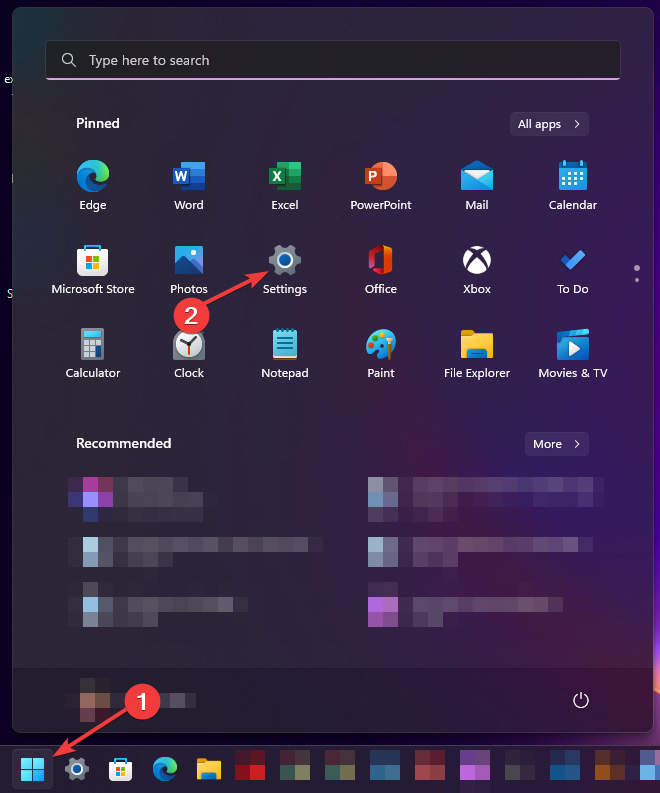
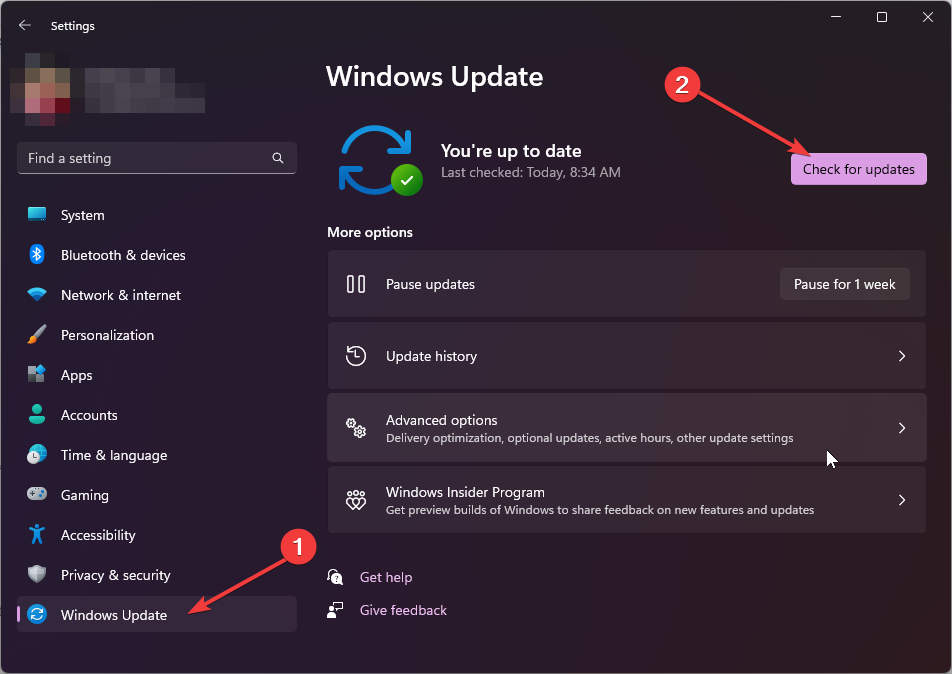
On Windows 11:
- Go to Start > Settings (Win + I)

- Go to Windows Update and click on the Check for updates button

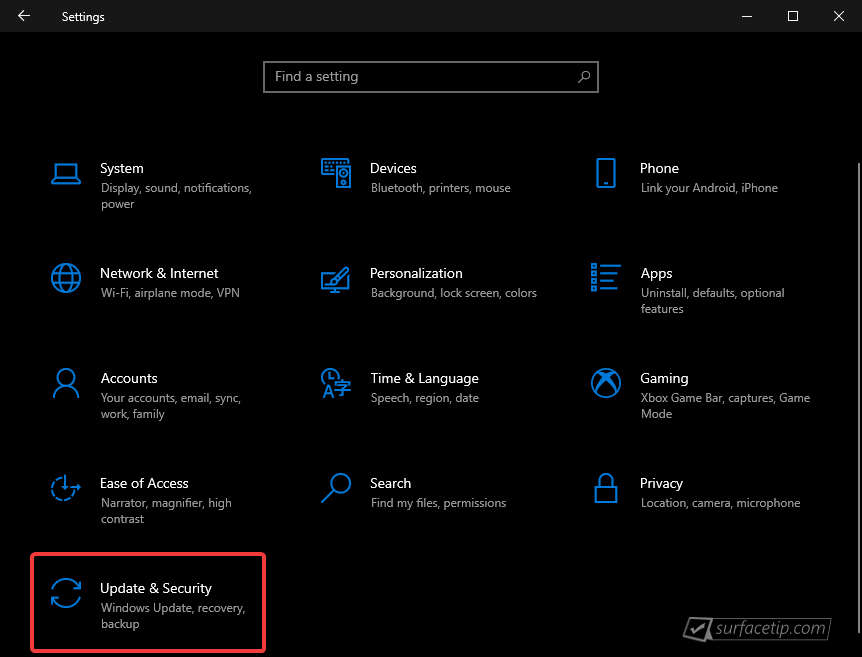
On Windows 10:
- Go to Start > Settings > Update & security.

- From the Windows Update tab, click Check for updates

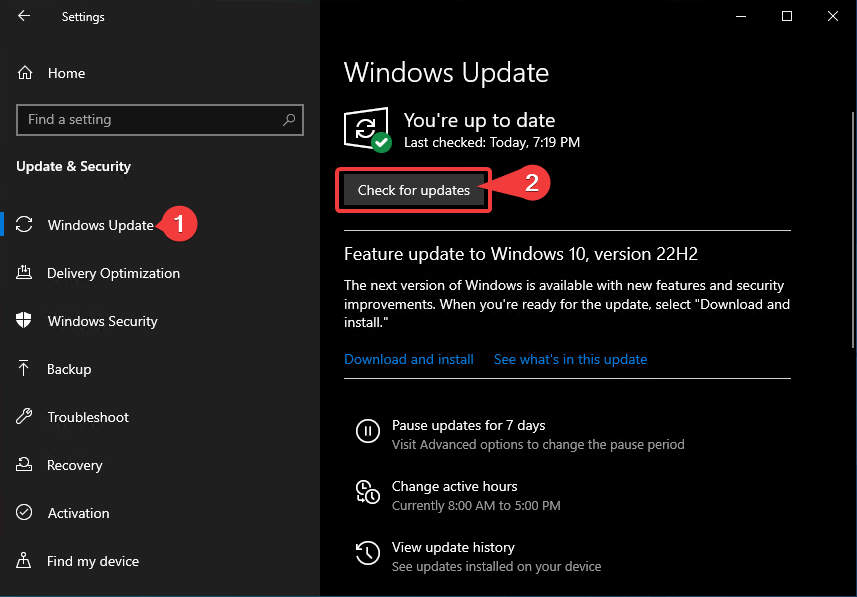
If your Surface Pro 7 didn’t receive the update, it should appear on the Windows Update list by now.
Downloading the Updates from Microsoft
Alternatively, you can download the latest cumulative driver and firmware update for Surface Surface Pro 7 from Microsoft Download Center via the following links.
- Surface Pro 7 Drivers and Firmware
https://www.microsoft.com/download/details.aspx?id=100419
Surface Pro 7 Update History
 Device driver and firmware servicing period has ended, this device is no longer within its driver and firmware servicing period and will no longer receive new updates. However, previously released updates will remain available for download, to stay current with the latest performance, battery life, and AI-powered experiences, explore the newest Surface PCs—created with the signature Surface design and built for modern productivity, and explore the newest Surface PCs.View
- Support for Windows 10 ended on October 14, 2025, microsoft is no longer providing free software updates from Windows Update, technical assistance, or security fixes for Windows 10. Your PC will still work, but we recommend moving to Windows 11, and learn more.View
- How to get updates, improvements and fixes in the updates, and additional steps for Surface Pro 7.View
- Addresses potential security vulnerabilities related to Intel® Chipset Firmware Advisory INTEL-SA-01280 that may allow escalation of privilege or information disclosure. .View
- Addresses device security vulnerabilities against potential threats, ensures that devices can boot successfully using the Preboot Execution Environment (PXE), and enhances device connectivity and functionality when docked, ensuring seamless compatibility and improved performance with connected peripherals.View
- Addresses the issue affecting the camera's performance caused by insufficient memory or storage capacity and enhances the overall security posture of the devices, protecting customers from potential threats.View
- Addresses a potential security vulnerability related to Intel® Security Advisories INTEL-SA-00999, INTEL-SA- 01083 & INTEL-SA- 01071, addresses the issue affecting the camera's performance caused by insufficient memory or storage capacity, solves the issue that was leading to flickering or flashing screen when the device is connected to Surface Dock 2, and resolves the issue that was preventing the Battery Limit setting to function as expected.View
- Addresses data collection regulatory requirements and updates the consent experience for data transmission.View
- Addresses a potential security vulnerability related to Intel® Security Advisories INTEL-SA-00923, INTEL-SA-00929 & INTEL-SA-00950.View
- Addresses a potential security vulnerability related to Intel® Security Advisories INTEL-SA-00923, INTEL-SA-00929 & INTEL-SA-00950 and prevents overheating and maintains energy efficiency of the device.View
- Enables auto-pairing of Surface Slim Pen 2 with the device and improves auto binding to provide a seamless workflow.View
- Improves Graphics stability, addresses issue display black screen when playing Netflix video in full screen, improves issue with Surface Pen inking, and improves Surface Dock 3 stability.View
- Improves device wireless stability and this update addresses a potential security vulnerability related to Intel® Security Advisory INTEL-SA-00783, addressing CVE-2022-29871.View
- Improves device camera performance and stability and addresses potential security vulnerability and improves system stability.View
- Addresses security vulnerability and improves system stability and performance, improves device charging performance and stability. , and resolves a device booting to Surface logo issue. .View
- Addresses system camera performance and stability and resolves system bug checks, improves Windows Hello log-in stability, and improves connectivity to 3rd party docks.View
- Addresses critical security vulnerability and improves system stability and resolves Wi-Fi disconnect and settings toggle issues.View
- Improves system Camera performance and stability and resolves system bugcheck, improves Surface Dock 2 reliability, and improves Surface Slim Pen 2 inking.View
- Enables Windows 11 feature to improve battery life, improves graphics stability and performance, and addresses critical security vulnerability and improves system stability.View
- Surface System Aggregator update addresses CPU throttling issue, improves USBC performance, improves Touch and Pen stability when waking from sleep, improves Surface Dock 2 reliability, and improves upgrading to the latest Windows OS.View
- Improve system light balance and contrast, audio performance, system security, and system stability.
- Improve battery performance, Surface Dock USB performance, and the camera and associated system bugcheck performance.View


COMMENTS
Let us know what you think!
We appreciate hearing your thoughts, questions, and ideas about “Surface Pro 7 January 2020 update is now live”.