Microsoft has started rolling out new firmware updates for Surface Pro 9 5G. The latest update is available for Surface Pro 9 with 5G (SQ3 Processor) devices running Windows 11 Update, Version 22H2, or later.
The new firmware update improves product experience, addresses system performance, stability, and resolves system bug checks, addresses critical security vulnerability, and more. The update is listed as a “June 12 release” on the Surface Pro 9 5G Update History page.
Changelog for June 12, 2023 Updates
Below is the complete changelog provided by Microsoft for the new updates. It includes the name and version listed in the Windows Updates and the name listed in Device Manager.
| Driver Version | Device Manager |
|---|---|
| 4.15.12412.20015 | ELAN WBF Fingerprint Sensor |
| 1.0.7.0 | Microsoft Effect Pack: Audio, Camera Extension |
| 1.0.3681.5800 | Qualcomm Secure Processor Device |
| 1.0.3681.5800 | Qualcomm URS Extension |
| 1.0.3681.5800 | Qualcomm Wan Power Down Driver |
| 1.0.3551.9400 | Qualcomm(R) ACPI Bridge Device |
| 30.0.3681.5802 | Qualcomm(R) Adreno(TM) 8cx Gen 3 |
| 30.0.3702.9605 | Qualcomm(R) Adreno(TM) 8cx Gen 3 Surface Extension |
| 1.0.3638.8100 | Qualcomm(R) Analog-to-Digital Converter Device |
| 1.0.3681.5800 | Qualcomm(R) Aqstic(TM) |
| 1.0.3513.8501 | Qualcomm(R) Aqstic(TM) |
| 1.0.3681.5800 | Qualcomm(R) Aqstic(TM) Audio Adapter Device |
| 1.0.3681.5800 | Qualcomm(R) Aqstic(TM) Audio DSP and Calibration Manager |
| 1.0.3681.5800 | Qualcomm(R) Audio DSP Subsystem Device Extension |
| 1.0.3638.8100 | Qualcomm(R) Audio RPC Daemon Device |
| 1.0.3551.9400 | Qualcomm(R) BAM Bus Device |
| 1.0.3681.5800 | Qualcomm(R) Bluetooth Radio Driver |
| 1.0.3681.5800 | Qualcomm(R) Bluetooth UART Transport Driver |
| 1.0.3681.5800 | Qualcomm(R) Combined Subsystem Driver |
| 1.0.3638.8100 | Qualcomm(R) Compute DSP Subsystem Device Extension |
| 1.0.3551.9400 | Qualcomm(R) Data IPC Router Device |
| 1.0.3638.8100 | Qualcomm(R) Device Crash Dump Injector Service |
| 1.0.3638.8100 | Qualcomm(R) FastRPC Device |
| 1.0.3551.9400 | Qualcomm(R) GPI Bus Device |
| 1.0.3611.3300 | Qualcomm(R) I2C Bus Device |
| 1.0.3586.6600 | Qualcomm(R) I2C Bus Device Extension |
| 1.0.3600.9600 | Qualcomm(R) Inter Processor Communication Interrupt Device |
| 1.0.3681.5800 | Qualcomm(R) IOMMU Device |
| 1.0.3681.5800 | Qualcomm(R) IOMMU Device Extension |
| 18.52.1.16 | Qualcomm(R) Mobile Broadband Update Device |
| 1.0.3681.5800 | Qualcomm(R) PCIe Platform Extension Plugin |
| 1.0.3681.5800 | Qualcomm(R) Peripheral Image Loader Device |
| 1.0.3681.5800 | Qualcomm(R) Peripheral Image Loader Device Extension |
| 1.0.3681.5800 | Qualcomm(R) Peripheral Image Loader Device Extension |
| 1.0.3638.8100 | Qualcomm(R) Power Management FGBCL Device |
| 1.0.3638.8100 | Qualcomm(R) Power Management PMIC Apps Device |
| 1.0.3638.8100 | Qualcomm(R) Power Management PMIC Device |
| 1.0.3681.5800 | Qualcomm(R) Power Management PMIC GLink Device |
| 1.0.3638.8100 | Qualcomm(R) Power Management PML0 Extension |
| 1.0.3638.8100 | Qualcomm(R) Protection Domain Service Registry Device |
| 18.52.1.8 | Qualcomm(R) QMUX Interconnect |
| 1.0.3638.8100 | Qualcomm(R) Reset Power Error Notifier Device |
| 1.0.3681.5800 | Qualcomm(R) Secure Kernel Extension |
| 1.0.3681.5800 | Qualcomm(R) Secure Processor Subsystem Device Extension |
| 1.0.3681.5800 | Qualcomm(R) Shared Memory Port Device |
| 1.0.3638.8100 | Qualcomm(R) Slimbus Device |
| 1.0.3681.5800 | Qualcomm(R) SOC Partition Interface Device |
| 1.0.3681.5803 | Qualcomm(R) Spectra(TM) 395 ISP |
| 1.0.3681.5803 | Qualcomm(R) Spectra(TM) 395 ISP |
| 1.0.3681.5803 | Qualcomm(R) Spectra(TM) 395 ISP |
| 1.0.3681.5803 | Qualcomm(R) Spectra(TM) 395 ISP Camera AVStream Device |
| 1.0.3681.5800 | Qualcomm(R) Spectra(TM) 395 ISP Camera Device |
| 1.0.3681.5800 | Qualcomm(R) Spectra(TM) 395 ISP Camera Device Extension |
| 1.0.3681.5800 | Qualcomm(R) Spectra(TM) 395 ISP Camera Flash Device |
| 1.0.3681.5800 | Qualcomm(R) Spectra(TM) 395 ISP Camera Flash Device Extension |
| 1.0.3681.5800 | Qualcomm(R) Spectra(TM) 395 ISP Camera JPEG Encoder Device |
| 1.0.3681.5800 | Qualcomm(R) Spectra(TM) 395 ISP Camera MipiCsi Device |
| 1.0.3681.5800 | Qualcomm(R) Spectra(TM) 395 ISP Camera MipiCsi Device Extension |
| 1.0.3681.5800 | Qualcomm(R) Spectra(TM) 395 ISP Camera Platform Device |
| 1.0.3564.4300 | Qualcomm(R) SPI Device |
| 1.0.3551.9400 | Qualcomm(R) SPMI Bus Device |
| 1.0.3551.9400 | Qualcomm(R) SSG Secure Services Device |
| 1.0.3638.8100 | Qualcomm(R) Subsystem Thermal Manager Driver |
| 1.0.3638.8100 | Qualcomm(R) System Cache Device |
| 1.0.3551.9400 | Qualcomm(R) System Manager Device |
| 1.0.3681.5800 | Qualcomm(R) System Manager Device |
| 1.0.3681.5800 | Qualcomm(R) System Manager Device Extension |
| 1.0.3551.9400 | Qualcomm(R) System Manager DiagRouter Device |
| 1.0.3638.8100 | Qualcomm(R) System Manager GPIO Device |
| 1.0.3681.5800 | Qualcomm(R) System Manager PMIC GPIO Framework Extension Device |
| 1.0.3681.5800 | Qualcomm(R) System Manager Power Engine Plug-in Device |
| 1.0.3681.5801 | Qualcomm(R) System Manager Qcom Device Extension |
| 1.0.3638.8100 | Qualcomm(R) System Manager SCM Device |
| 1.0.3681.5800 | Qualcomm(R) System Manager Secapp Device |
| 1.0.3638.8100 | Qualcomm(R) System MMU Device |
| 1.0.3681.5800 | Qualcomm(R) TFTP Device |
| 1.0.3551.9400 | Qualcomm(R) UART Bus Device |
| 1.0.3681.5800 | Qualcomm(R) USB Type-C Device |
| 1.0.3681.5800 | Qualcomm(R) USB3(TM) Device Controller |
| 1.0.3681.5800 | Qualcomm(R) USB3(TM) eXtensible Host Controller |
| 1.0.3681.5801 | Qualcomm(R) WCN685x Wi-Fi 6E Dual Band Simultaneous (DBS) WiFiCx Network Adapter |
| 1.0.3551.9400 | Qualcomm(R) Windows WLAN Sleep Manager Driver |
| 1.0.3681.5801 | Qualcomm(R) Wlan Thermal Mitigation Device Extension |
| 1.42.137.0 | Surface ACPI Wake Alarm |
| 2.129.139.0 | Surface Battery |
| 4.95.139.0 | Surface Button |
| 1.0.3681.5803 | Surface Camera Aux Sensor Device Extension |
| 1.0.3681.5803 | Surface Camera AVStream Device Extension |
| 1.0.3681.5803 | Surface Camera Front Sensor Device Extension |
| 1.0.3681.5803 | Surface Camera Platform Device Extension |
| 1.0.3681.5803 | Surface Camera Rear Sensor Device Extension |
| 1.49.5.0 | Surface EEPROM |
| 10.14.0117.2020 | Surface Ethernet Adapter |
| 1.1696.137.0 | Surface G6 Touch Firmware Update Extension |
| 3.95.139.0 | Surface Hid Mini Driver |
| 3.204.3.0 | Surface Hot Plug Service |
| 71.62.9.0 | Surface Integration |
| 6.213.2.0 | Surface Integration Service |
| 6.170.139.0 | Surface Panel |
| 3.13.137.0 | Surface Panel |
| 3.49.139.0 | Surface Pen BLE LC Adaptation Driver |
| 1.0.3681.5800 | Surface Pro Qualcomm(R) Aqstic(TM) Audio Codec Driver Extension |
| 8.150.139.0 | Surface SMF Client Driver |
| 1.173.2.0 | Surface SMF Qualcomm CPU Client Driver |
| 2.136.139.0 | Surface SPT Core |
| 5.43.139.0 | Surface System Aggregator |
| 4.90.139.0 | Surface Tcon |
| 8.89.139.0 | Surface Thermal Policy Driver |
| 1.112.139.0 | Surface Type Cover V7 Fingerprint UDE Controller |
| 2.128.139.0 | Surface Type Cover v7 Firmware Update |
| 15.1.139.0 | Surface UEFI |
Getting the Updates via Windows Update
You can get this new Firmware Update via Windows Updates, as we detailed here:
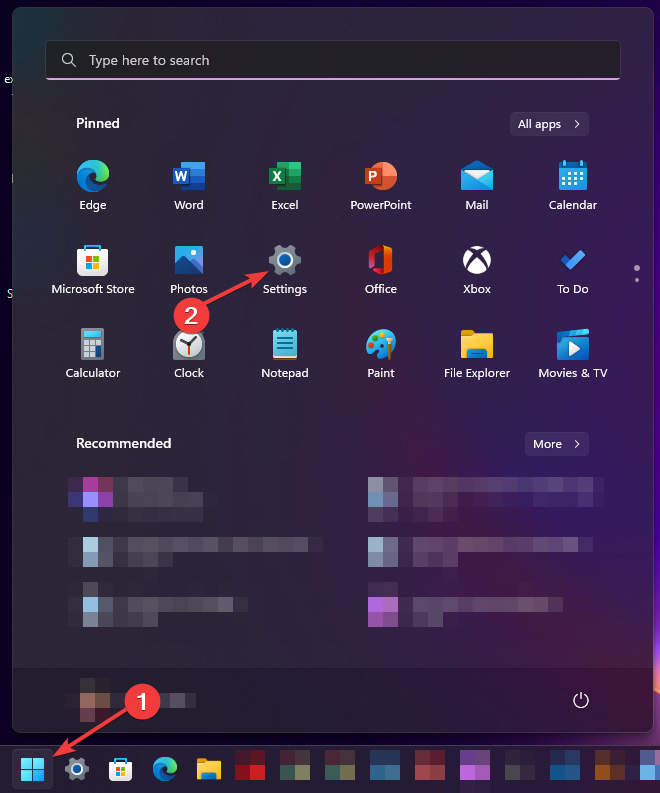
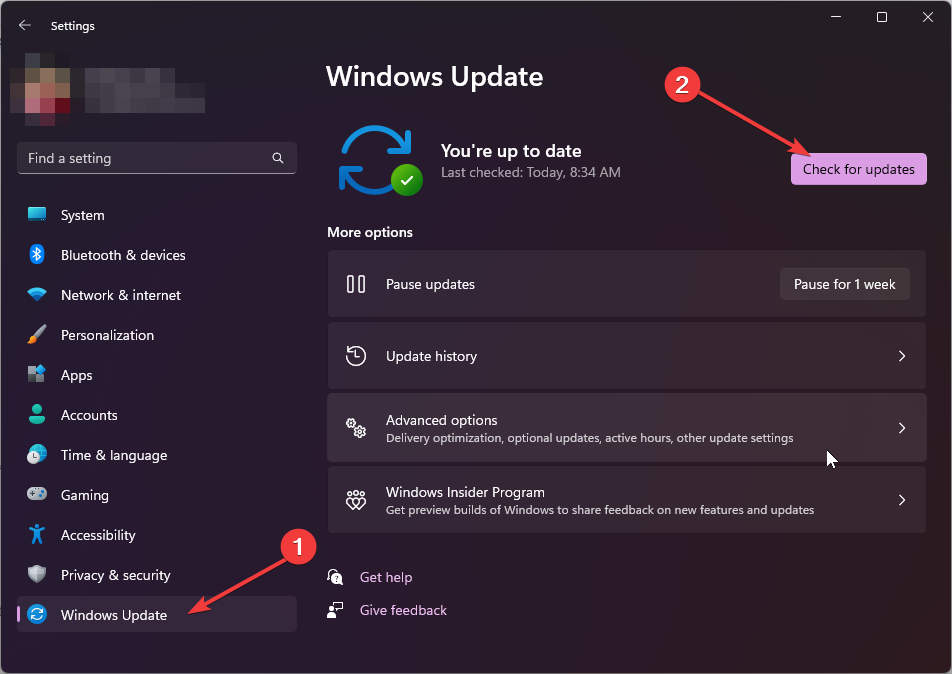
On Windows 11:
- Go to Start > Settings (Win + I)

- Go to Windows Update and click on the Check for updates button

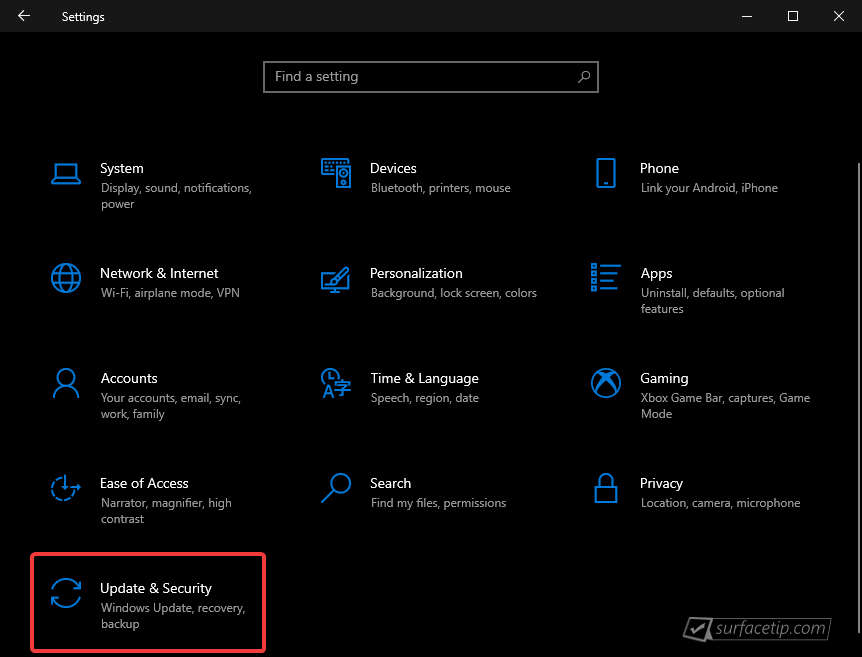
On Windows 10:
- Go to Start > Settings > Update & security.

- From the Windows Update tab, click Check for updates

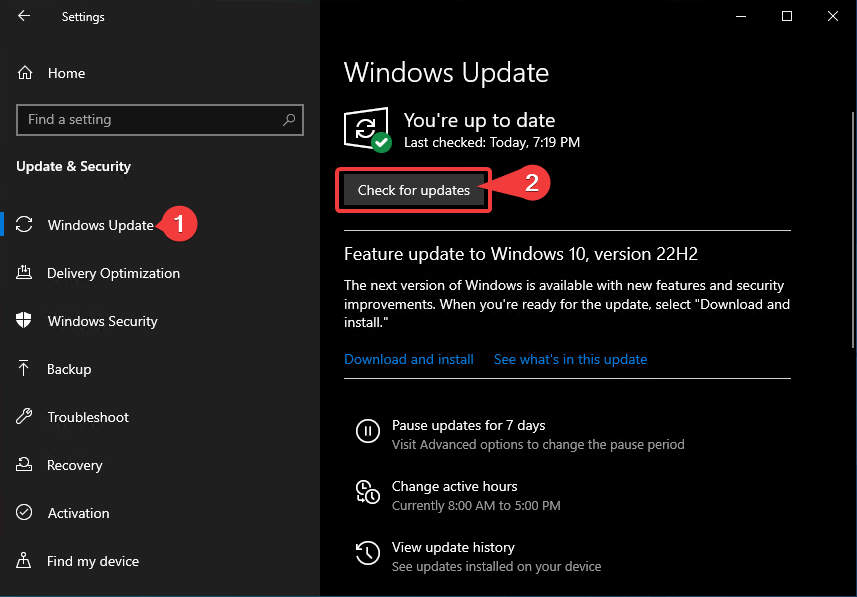
If your Surface Pro 9 with 5G didn’t receive the update, it should appear on the Windows Update list by now.
Surface Pro 9 Update History
 Surface Pro 9View
How to get updates, improvements and fixes in the updates, and additional steps for Surface Pro 9 with Intel Processor.
- Surface Pro 9View
How to get updates, improvements and fixes in the updates, and additional steps for Surface Pro 9 with Intel Processor.
- Surface Pro 9View
How to get updates, improvements and fixes in the updates, and additional steps for Surface Pro 9 with Intel Processor.
- Surface Pro 9 5GView
Addresses potential security vulnerabilities related to Qualcomm advisories CVE-2024-43046, CVE-2025-21464, CVE-2025-21465, CVE-2025-21469, CVE-2025-21470, CVE-2025-21482, CVE-2025-27050, CVE-2025-27053, CVE-2025-27054, CVE-2025-27055, CVE-2025-47323, CVE-2025-47327, CVE-2025-47341, CVE-2025-47358, and CVE-2025-47359 that may cause memory corruption or allow information disclosure and resolves an issue where the camera stops responding.
- Surface Pro 9 5GView
How to get updates, improvements and fixes in the updates, and additional steps for Surface Pro 9 with 5G (SQ3 Processor).
- Surface Pro 9View
How to get updates, improvements and fixes in the updates, and additional steps for Surface Pro 9 with Intel Processor.
- Surface Pro 9View
Firmware updates can’t be uninstalled or reverted to an earlier version, when you install the latest update, you'll also get all the previous updates if your Surface doesn't have them already. Only updates that apply to Surface will be downloaded and installed, and after the updates are installed, restart your device to complete the installation process. To restart your device, select Start , and then select Power > Restart.
- Surface Pro 9View
Enables a dynamic backlight experience that will adjust your keyboard lighting for the best visibility as your environmental lighting conditions change.
- Surface Pro 9 5GView
Addresses potential security vulnerabilities related to Qualcomm advisories CVE-2024-43046, CVE-2025-21464, CVE-2025-21465, CVE-2025-21469, CVE-2025-21470, CVE-2025-21482, CVE-2025-27050, CVE-2025-27053, CVE-2025-27054, CVE-2025-27055, CVE-2025-47323, CVE-2025-47327, CVE-2025-47341, CVE-2025-47358, and CVE-2025-47359 that may cause memory corruption or allow information disclosure. and resolves an issue where the camera stops responding.
- Surface Pro 9View
Resolves an issue where the device incorrectly shows an “Unauthenticated battery detected” notification..
- Surface Pro 9View
Addresses potential security vulnerabilities related to Intel® PROSet/Wireless WiFi Software Advisory INTEL-SA-01398 that may allow denial of service. , addresses potential security vulnerabilities that may allow denial of service, escalation of privilege, code execution, or information disclosure, fixes an issue with incorrect serial numbers and model names for the device, and resolves an issue that results in devices using low-power Wi-Fi levels in some countries instead of the country-specific power levels.
- Surface Pro 9 5GView
Addresses a fingerprint authentication bypass security vulnerability to prevent spoofing attacks, addresses potential security vulnerabilities related to memory corruption as described in Qualcomm advisories CVE-2025-27075, CVE-2025-47355, and CVE-2025-47367. , and fixes an issue where the Surface Pro Flex Keyboard battery may stop charging while the device is asleep.
- Surface Pro 9View
Addresses a fingerprint authentication bypass security vulnerability to prevent spoofing attacks. , fixes an issue where the Surface Pro Flex Keyboard battery may stop charging while the device is asleep, and addresses an issue where the device may stop responding when customers use Surface Slim Pen 2.
- Surface Pro 9View
Addresses potential security vulnerabilities related to Intel® Chipset Firmware Advisory INTEL-SA-01280 that may allow escalation of privilege or information disclosure. .
- Surface Pro 9View
Addresses potential security issues that may allow escalation of privilege, denial of service, or information disclosure, improves stability by fixing blue screen issues related to using extended monitors, fixes interface issues between the graphics and camera to ensure stable performance, and reduces screen flickering that could potentially lead the device to stop responding or restart.
- Surface Pro 9 5GView
Addresses a security vulnerability related to Dolby advisory CVE-2024-44074 that compromised local privilege, enhances the stability of the device, reducing the occurrence of blue screen during instances including reboot and shutdown requests, and resolves an issue that prevented users from finding or selecting Dolby Atmos from the system tray audio options.
- Surface Pro 9 5GView
Ensures that devices can boot successfully using the Preboot Execution Environment (PXE) and enhances device connectivity and functionality when docked, ensuring seamless compatibility and improved performance with connected peripherals.
- Surface Pro 9View
Ensures that devices can boot successfully using the Preboot Execution Environment (PXE), addresses the issue that caused the USB 3.2 hub to reconnect after a Surface firmware upgrade, and enhances device connectivity and functionality when docked, ensuring seamless compatibility and improved performance with connected peripherals.
- Surface Pro 9 5GView
Ensures better visual performance through improvements in the graphic driver, improves the digitizer functionality to enhance touch and pen input accuracy, providing a more responsive and precise user experience. , and ensures a more stable and faster internet connection by making enhancements to the Wi-Fi module.
- Surface Pro 9 5GView
Enhances the overall security posture of the devices, protecting customers from potential threat.
- Surface Pro 9View
Enhances the overall security posture of the devices, protecting customers from potential threat. , ensures seamless audio playback and recording, improves stability preventing audio failure and drop out, and prevents unexpected failures or disruptions of audio streams by improving the stability and reliability of the audio system to enable uninterrupted audio playback and recording.
- Surface Pro 9View
Addresses security vulnerabilities, securing devices from potential threats and resolves an issue where the device unexpectedly shuts down due to inaccurate estimation of the remaining battery life.
- Surface Pro 9 5GView
Addresses an issue that prevented DFCI removal via network, addresses issues with keyboard working in Windows Recovery Environment (WinRE) or Windows Preinstallation Environment (WinPE). , fixes an issue where keypresses and the touchpad did not function correctly when connected to the device. , and more.
- Surface Pro 9View
Addresses security vulnerabilities, securing devices from potential threats. , improves the device's ability to connect with other devices through USB-C for direct peer-to-peer communication. , fixes an issue where keypresses and the touchpad did not function correctly when connected to the device. , and more.
- Surface Pro 9 5GView
Resolves an issue that prevented the device from using the USB-C functionality after the system had booted. , enhances the stability of the device, reducing the occurrence of blue screen, and mitigates a potential security vulnerability, increasing protection against unauthorized privilege.
- Surface Pro 9View
Addresses issues related to recovery of Wi-Fi and Bluetooth connections when device is on Standby and improves connection reliability, resolves a problem causing taskbar flickering and occasional device freezing when using a Slim Pen, and resolves an issue that prevented the device from using the USB-C functionality after the system had booted.
- Surface Pro 9 5GView
Enables a seamless experience of using the new Pro Flex Keyboard with Slim Pen on the latest Surface Pro devices.
- Surface Pro 9 5GView
Enhances the gaming experience by preventing glitches in the video playback, addresses an issue that was causing the device to unexpectedly crash, and fixes a flickering or screen flashing issue when the device is connected to Surface Dock 2.
- Surface Pro 9View
Addresses potential performance issues that can cause slowed mouse movements and slowed Windows animations.
- Surface Pro 9View
Enhances the audio system's stability and reliability to ensure seamless playback and recording, preventing any potential disruptions or failures that may interrupt audio streams.
- Surface Pro 9 5GView
Extends device security certificate authority and improves system performance and stability, and addresses system bugcheck.
- Surface Pro 9View
Extend device security certificate authority, improve Surface Thunderbolt 4 Dock stability, and improve the stability of Surface Machine Learning Service on Windows 10.
- Surface Pro 9View
Addresses Camera issue during conference calls and improves Hello facial recognition.
- Surface Pro 9View
This update addresses a potential security vulnerability related to Intel® Security Advisory INTEL-SA-00783, addressing CVE-2022-36392 & CVE-2022-38102.
- Surface Pro 9 5GView
Improves system performance and stability, and addresses system bugcheck, addresses issue with device activity while keyboard is closed, and improves Wi-Fi performance and stability.
- Surface Pro 9View
Addresses screen rotation issue, resolves "battery not genuine" notification, improves stability when attached to Surface Docks, and more.
- Surface Pro 9 5GView
Improves device stability. , addresses Hello face recognition issue, enables support for new docking accessories, and improves Surface Dock 2 stability.
- Surface Pro 9View
Enables the automatic download of Intel® Connectivity Performance Suite (ICPS) application on Surface Pro 9 consumer devices running Win 11 and have a hard disk capacity greater than 256 GB. ICPS is a software solution that improves PC networking performance by creating a personalized network experience based on each user's unique situation and improves device stability and wireless connection reliability.
- Surface Pro 9 5G
Improves product experience, addresses system performance, stability, and resolves system bug checks, addresses critical security vulnerability, and more.


COMMENTS
Let us know what you think!
We appreciate hearing your thoughts, questions, and ideas about “Surface Pro 9 5G June 2023 update is now available to install via Windows Update”.